No-Code AI Agents: A Marketer's Playbook
See how no-code AI agents can automate marketing reports, triage inquiries, and enforce governance with scoped data, approvals, and practical evaluation.
Overview
No-code AI agents let marketing, growth, RevOps, and sales-ops leaders turn manual, repetitive work into governed workflows without waiting for engineers. Microsoft 365 Copilot's Agent Builder can ground an agent in approved knowledge and move it from answering questions to taking actions. Vanaxity applies the same discipline to autonomous SEO, GEO, and AEO content operations. This guide provides an adoption checklist and the guardrails needed to automate safely.
Key Takeaways
No-code removes the development barrier, but it doesn't remove operational risk.
- Agent Builder gives non-developers a visual, natural-language path to a working agent.
- Approved knowledge can include SharePoint sites, uploaded documents, and Copilot connectors.
- Proactive actions create more value than chat alone, but they also create greater risk.
- The safest starting workflow is bounded, repetitive, frequent, and easy to reverse.
- Every production agent needs scoped access, approval gates, logs, failure recovery, and evaluation.
Map your SEO, GEO and AEO workflow before you build.

What Microsoft Documented and What Vanaxity Recommends
Microsoft documents the platform capability; Vanaxity recommends how marketing and revenue teams should apply it.
Reported fact: On August 10, 2026, Microsoft published a plain-language guide to building agents in Microsoft 365 Copilot. The guide says professionals can ideate, build, and scale custom agents. These agents can use internal knowledge, including SharePoint content or a shared inbox. They can also take proactive, independent actions instead of waiting for another chat question.
Microsoft's guide frames the shift plainly: "Any professional can ideate, build, and scale custom agents in Microsoft 365 Copilot."
Vanaxity analysis: Marketing teams should apply these building blocks to narrow workflows such as reporting, inquiry triage, and campaign quality checks. Connecting approved campaign data or CRM assets could reduce agency and engineering handoffs. It may also shorten the path from an idea to a working automation. These are operating recommendations, not Microsoft ROI claims or guaranteed outcomes.
Vanaxity is Van Data Team's content agent for SEO, generative engine optimization, or GEO, and answer engine optimization, or AEO. It researches, writes, illustrates, publishes, and syndicates content through reviewed workflows. Teams facing similar automation problems can review Vanaxity's agentic AI framework for marketing, which applies this operating discipline across data pipelines, agents, reporting, and delivery gates.
Microsoft's products and controls will continue to change. Verify exact features, plan requirements, permissions, and administrative settings in current Microsoft documentation before deployment.
What Can Marketers Build Without Code?
Marketers can create focused agents that understand a job, use approved business knowledge, and prepare or complete defined actions.
Agent Builder provides a visual, natural-language interface. A marketer describes the agent's role, instructions, knowledge, and expected output. The result is a declarative agent, meaning its behavior is shaped by written instructions and selected sources rather than custom code.
Knowledge makes that agent useful. A campaign agent could read an approved brand guide and current product claims. A reporting agent could use channel exports stored in a permitted SharePoint site. An inbox agent could work from a shared mailbox.
A connector is a controlled link between an agent and another source or system. It can make approved information available without placing every document in the same location. Secure access still depends on the permissions behind that connection.
Actions move the agent beyond retrieval. Instead of only finding campaign data, an agent can prepare a summary, route an inquiry, or flag copy that conflicts with policy. Microsoft's guide describes this shift toward proactive work. The wider Microsoft 365 Copilot agents overview also covers multi-step workflows across Microsoft 365 and external applications. Agent experiences can surface in Teams, Outlook, SharePoint, and custom applications.
Traditional Automation vs. No-Code AI Agents
| Comparison point | Traditional Automation | No-Code AI Agents |
|---|---|---|
| How the workflow is defined | Predefined rules, scripts, or technical configuration | Visual, natural-language instructions and selected knowledge |
| Change path | A rule, script, or integration is changed through the technical workflow | Marketing and RevOps can adjust a bounded workflow directly |
| Knowledge inputs | Sources are explicitly mapped into the automation | Approved sites, documents, inboxes, and connectors can ground the workflow |
| Typical output | Executes predefined, repeatable steps | Can draft summaries, classify and route inquiries, flag policy conflicts, and prepare or take defined actions |
| Tooling escalation | Custom logic and integrations remain part of the technical build | Copilot Studio supports more complex logic and integrations; pro-code tools support custom applications and specialized controls |
| Control needs | Permissions, monitoring, and recovery depend on the workflow's risk | Scoped access, approval gates, logs, evaluation, and failure recovery remain necessary |
No-code isn't the right answer for every workflow. Microsoft offers no-code, low-code, and pro-code paths. Copilot Studio fits more complex logic and integrations. Pro-code tools fit custom applications, specialized controls, or behavior that a visual builder can't express cleanly.
Which No-Code AI Agents Should You Build First?
The best first agent handles a bounded, repetitive, high-frequency task where mistakes are visible and reversible.
At Van Data Team, we start by separating useful automation from risky autonomy. The mistake we often see is choosing the most impressive workflow. Teams should choose the clearest workflow instead.
The following matrix is Vanaxity analysis, not a list of Microsoft recommendations.
| Candidate workflow | Safe initial scope | Human gate | What to measure |
|---|---|---|---|
| Multi-channel performance reporting | Collect approved inputs and draft a summary | A marketer verifies figures and interpretations | Weekly reporting cycle duration from approved-source collection to a review-ready summary, required-field completeness, and corrections per approved report |
| Inquiry triage | Classify, route, and draft responses from a scoped inbox | A person handles uncertain cases and approves external replies | Correct destination per inquiry, misroutes per reviewed batch, and cases escalated for human handling |
| Campaign QA | Compare copy and assets with approved brand and claims guidance | A campaign owner makes every launch decision | Confirmed issues found per reviewed campaign, false alarms, and missed policy conflicts |
| Customer sends, spend changes, or CRM updates | Keep execution supervised during the initial rollout | Require explicit approval before any action | Incorrect actions per approved batch, reversals, and attempts made without required approval |
Use observed values instead of unsupported estimates. For example, report “weekly reporting cycle: [recorded manual duration] to [recorded agent-assisted duration]” instead of “time saved.”
Consider a hypothetical growth lead named Maya. Her team manually combines channel reports each week. She configures an agent to collect approved inputs, identify missing data, and draft a summary. The agent doesn't invent a result when a source is absent. It flags the gap for Maya.
That scope creates useful use without giving the agent control over spending or customer communication. Maya remains responsible for the final figures and interpretation. Corrections also reveal whether the problem came from instructions, permissions, or source data.
A strong starting workflow has clear inputs, a repeatable output, and a named owner. If the team can't define the expected result, it isn't ready to automate the task.
How Should You Govern No-Code AI Agents?
Governance starts by limiting what the agent can see, decide, and change.
Use least-privilege access. Least privilege means giving the agent only the information required for its job. A campaign QA agent may need the brand guide and approved claims. It doesn't need payroll files, contracts, or every CRM record.
Scope every permission. Name the exact SharePoint sites, folders, inboxes, uploaded files, and connectors the agent may use. Broad access creates hidden risk. It can also reduce answer quality by adding irrelevant material.
Gate consequential actions. Require human approval before publishing, sending customer messages, changing spend, or updating business records. Drafting and recommending are safer than executing. Autonomy should expand only after the workflow proves reliable.
Set brand-safety rules. Give the agent approved tone, evidence standards, current claims, and prohibited language. State what it must do when evidence is missing. "Escalate instead of guessing" is a valuable instruction.
Keep an audit trail. Record the input, retrieved sources, output, attempted action, approval, and exception. Observability means being able to inspect what the agent received, produced, and tried to do. Without that view, teams can't diagnose a bad result.
The operating model should also track cost, latency, token budget, and review burden. Latency is the time required to return or complete useful work. A token budget limits how much model processing and context a task can consume. Larger workflows may cost more, respond more slowly, and require more review.
Failure recovery matters too. Define how to pause the agent, route work to a person, correct an output, and reverse an allowed record change. Vanaxity's broader guidance on AI marketing governance applies the same principle: capability must stay inside an accountable operating system.
For a practical starting point, request a free Vanaxity scan. The output can include a scoped workflow review, data-source map, approval design, evaluation plan, and delivery sequence.
How Do You Know the Agent Works?
An agent works when it improves the current process without creating unacceptable errors, delays, or review work.
Evaluation means testing outputs and actions against documented expectations. Start by recording the human baseline. Measure the duration from approved inputs becoming available to a review-ready output, correctness, completeness, brand compliance, error frequency, escalation frequency, action reversals, cost, and latency.
Use held-out checks before reducing oversight. A held-out check is a test case that wasn't used while configuring the agent. It shows whether the agent learned a durable process or merely fits familiar examples.
For campaign QA, include unseen copy with outdated claims, missing evidence, and subtle tone problems. For inquiry triage, test vague requests, duplicate messages, and cases that belong with a human specialist. For reporting, remove a source or change a field label. The agent should expose uncertainty rather than hide it.
Don't borrow a universal pass threshold. Document what your team accepts before launch. Then group failures by cause:
- Weak instructions
- Missing or outdated knowledge
- Incorrect permissions
- Unsafe action design
- Poor escalation rules
- Broken source mappings
This diagnosis matters. Rewriting a prompt won't fix stale campaign data. Adding data won't fix an approval rule that allows the wrong action.
What Changes When Marketers Own Automation?
Marketer-owned automation shortens the path from workflow idea to controlled prototype, but it doesn't remove shared responsibility.
Marketing and RevOps teams can now shape bounded automations without opening an engineering request for every change. Engineering, IT, security, and legal still define platform boundaries. They also set rules for data access, retention, customer communication, and incident response.
Agency relationships may change as well. Routine assembly work can move inside the team. Agencies can focus more on strategy, creative direction, specialist execution, and independent review. That shift isn't automatic. It depends on clean data, clear ownership, and maintained controls.
The framework is vendor-neutral. Other agent builders may use different interfaces, connectors, and models. Every production decision still depends on cost, latency, observability, evaluation, review burden, and recovery.
The same discipline drives agentic AI in marketing. Vanaxity applies it to omnichannel visibility. Content must rank in search, appear in AI answers, earn citations, and stay consistent across distribution channels.
No-Code Agent Adoption Checklist
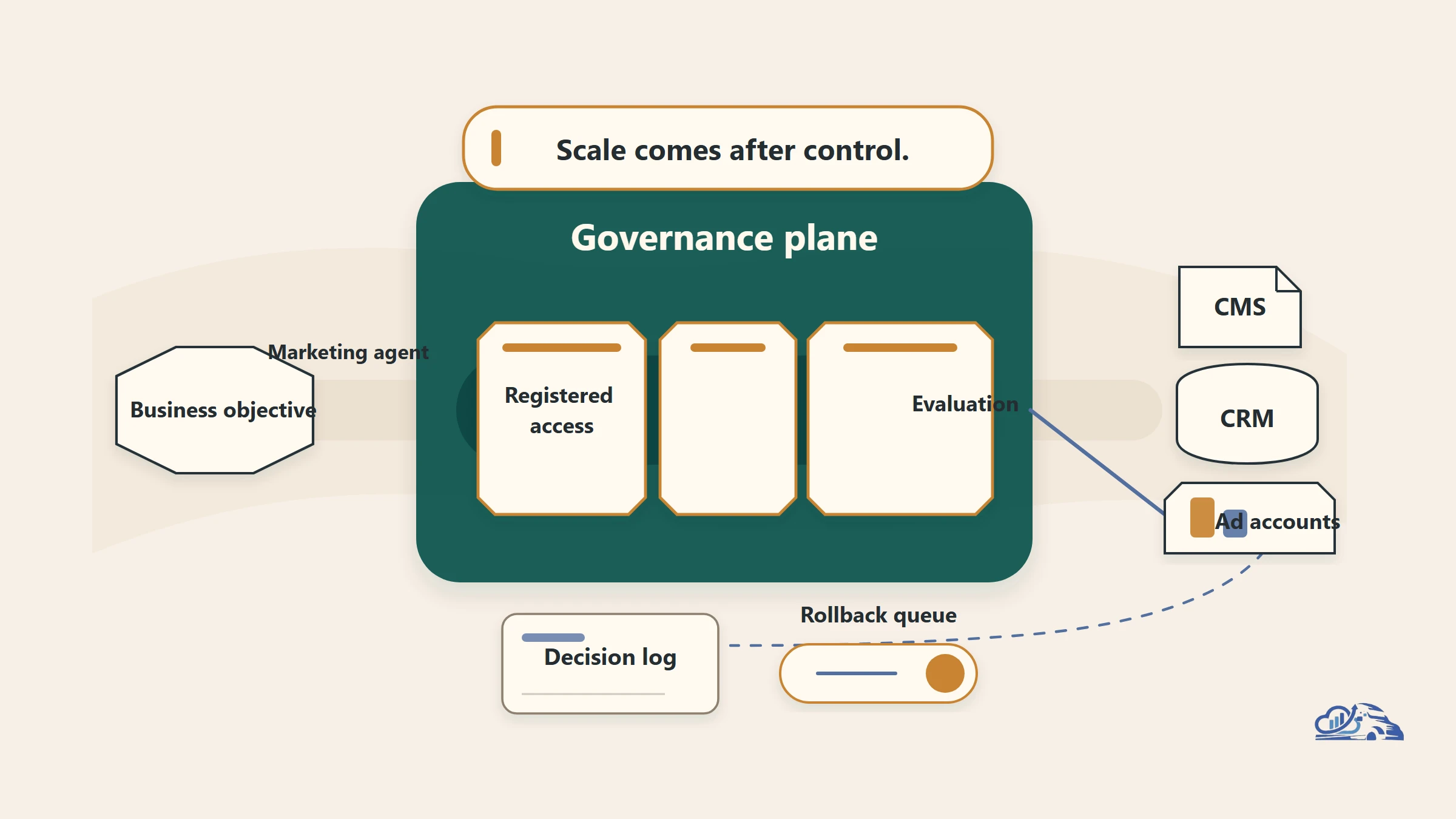
The following illustration summarizes from safe pilot to controlled scale:
Figure 1. A no-code agent should earn greater autonomy by passing clear data, approval, and evaluation gates.
A safe rollout moves from a narrow workflow to measured autonomy through explicit control gates.
- Pick the workflow. Choose a bounded, repetitive, low-risk task. Define its owner, trigger, inputs, expected output, and failure path.
- Scope the data. List every permitted source and connector. Record excluded folders, inboxes, records, and sensitive fields.
- Set approvals. Mark each output as informational, draft-only, approval-required, or executable. Keep sends, spend, publishing, and record changes behind human confirmation.
- Measure performance. Compare the recorded cycle duration from approved inputs to review-ready output, quality, errors, escalations, cost, latency, and review effort with the existing process. Include held-out cases and unusual inputs.
- Expand carefully. Add knowledge, actions, or autonomy only after the current scope performs reliably. Pause expansion when failures remain unexplained.
The practical architecture is simple: a request or trigger reaches scoped knowledge, instructions shape the response, an approval gate controls consequential action, and logs feed evaluation. Each stage needs an owner.
Vanaxity's AI marketing governance framework applies the same staged model across research, writing, visual production, review, publishing, and syndication. A free audit can turn this checklist into a workflow map, governance plan, measurement scorecard, and phased implementation scope for your site.
Tooling And Landscape Fit
Microsoft 365 Agent Builder fits teams already working in Teams, Outlook, and SharePoint. It offers a direct path from plain-language instructions to governed workflows. Other no-code AI agents may fit teams with different systems or wider vendor needs. The best choice depends on existing data access, admin controls, and where employees work.
Use one agent for a clear workflow before considering multi-agent orchestration. Multi-agent orchestration means several specialized agents pass work between each other. It can help with complex processes, but it also adds cost, delay, and more failure points. Copilot Studio suits deeper integrations and branching logic. A pro-code framework, such as a LangGraph agent workflow, fits custom runtime behavior that technical teams need to control directly.
Compare every option across four operating dimensions. Cost covers licenses, usage, maintenance, and human oversight. Latency means how long the workflow takes. Observability means seeing what the agent accessed, decided, and changed. Evaluation tests whether its output stays accurate, useful, and safe. Connectors and knowledge sources also need separate review. Easy access to data doesn’t make that data clean, current, or appropriate. Choose the simplest approach that meets the workflow’s control needs.
Frequently asked questions
Do I need to know how to code to build an AI agent?
Not for a basic declarative agent. Agent Builder lets a non-developer describe the job through a visual, natural-language experience. More complex integrations, custom logic, or tailored application behavior may require Copilot Studio or pro-code tools.
What knowledge can a Microsoft 365 Copilot agent use?
Agent Builder can ground an agent in SharePoint sites, uploaded documents, and Microsoft 365 Copilot connectors. Microsoft's guide also discusses internal sources such as a shared inbox. Access should remain limited to the exact sources required by the workflow.
Can a no-code agent take actions instead of only answering questions?
Yes. Microsoft's guide describes agents taking proactive, independent actions. The platform also supports multi-step work across Microsoft 365 and external applications. Actions that send, spend, publish, or alter records should remain approval-gated until evaluation supports greater autonomy.
What is the safest marketing workflow to automate first?
Start with a frequent, low-risk task that produces a reviewable draft. Performance summaries and campaign QA are strong candidates. The workflow should have clear inputs, an expected output, visible errors, and an accountable human owner.
Should an agent send customer messages on its own?
Not during the initial rollout. Keep customer communication in draft-only mode or require explicit approval. Apply the same rule to budget changes and CRM updates. Expand autonomy only after held-out tests and live logs show acceptable failure patterns.
How should we measure an agent?
Compare it with the current process. Track the recorded cycle duration from approved inputs to a review-ready output, output quality, policy compliance, errors, escalations, reversals, cost, latency, and human review effort. Inspect failures by type before changing instructions, knowledge, permissions, or action rules.